SEO for Developers
Discovered - currently not indexed: why, and how to fix it
166 of my own pages were stuck in Search Console. Every one was on the wrong address.

Today I opened Search Console for my own site and found 166 pages stuck as "Discovered - currently not indexed". Every single one of them was listed under the wrong web address.
This post shows what that status really means, how to check if it is a real problem on your site, and how to fix it at the source instead of clicking "Request indexing" 166 times.
What does "Discovered - currently not indexed" mean?
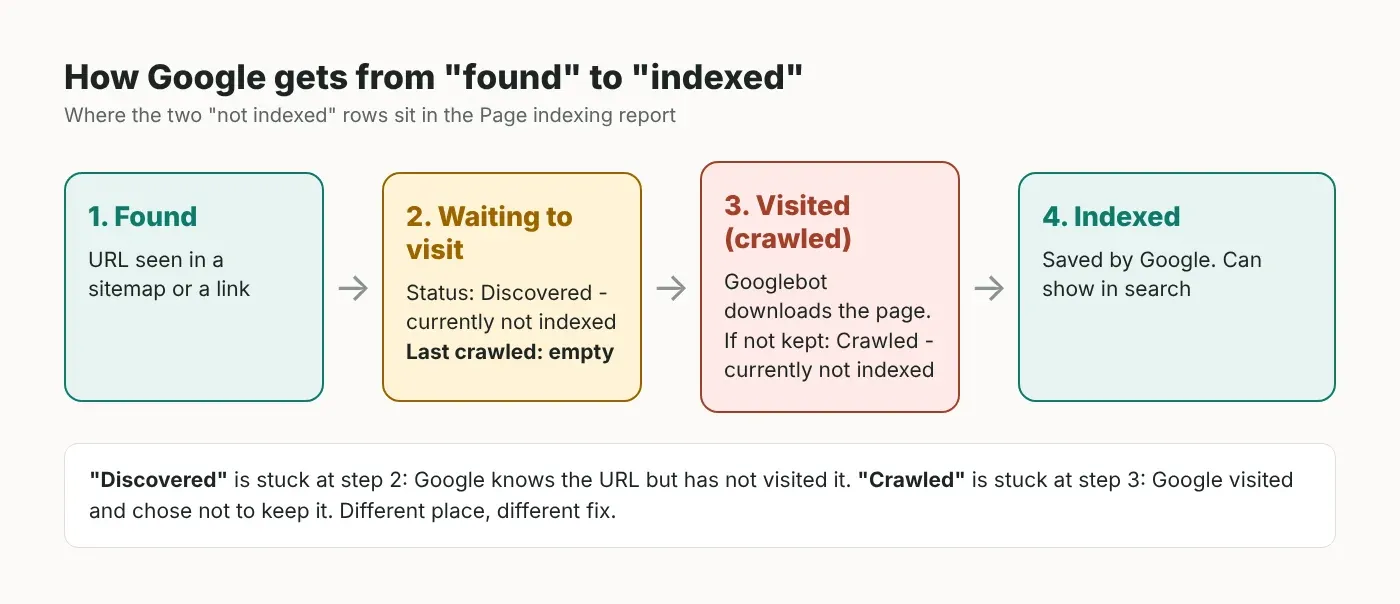
It means Google knows the URL exists, from a sitemap or a link, but has not visited it yet. Google's own help page says it usually wanted to crawl the page but expected that to overload the site, so it moved the visit to later. The page itself is usually fine. The cause is usually somewhere else on the site.
Here is the exact wording from Google's Page indexing report help: the page "was found by Google, but not crawled yet". That is why the "Last crawled" column is empty for these URLs. ("Crawl" just means Googlebot downloading the page. "Index" means Google saving it so it can show up in search.)
This is different from "Crawled - currently not indexed", where Google did visit the page and decided not to keep it. If that is the row you are fighting, I've written a separate guide for "Crawled - currently not indexed". The fixes are different.
What I found when I checked my own site
All 166 "Discovered" URLs on sandipandas.dev used the address without "www", while the real pages live on the www address. The sitemap was pointing Google at an address that only redirects.
I've been building websites since 2017, and I still had this on my own site. Here is what I checked on 1 November 2026, mostly inside Google Search Console, which is Google's own data, not a guess from a browser:
Check | Tool | Result |
|---|---|---|
Pages with "Discovered - currently not indexed" | Page indexing report | 166 (177 pages indexed, 262 not indexed in total) |
Which address those 166 use | Page indexing report, example list | 166 of 166 on sandipandas.dev (no www), "Last crawled" empty for all |
What kind of pages | Same list, grouped by folder | 70 city landing pages, 45 project pages, 16 service pages, 13 blog posts, 11 tool pages, 11 others |
Which address the sitemap lists | The live sitemap files (6 files) | 262 of 262 URLs on the no-www address; the "Sitemap:" line in robots.txt (the file that tells search engines where they may go) also uses it |
Is the www version of 5 sample pages indexed? | URL Inspection | Of 4 live pages: 2 indexed, 2 "URL is unknown to Google" with no sitemap pointing to them. The 5th sample was an old post that now redirects to the blog page, but it's still in the sitemap |
Is the server too slow? | Crawl stats (last 90 days) | Average response time 168 ms; 94% of crawl requests got a 200 (OK) answer |
What I did not test: I didn't read raw server logs, I only checked 5 pages one by one with URL Inspection (and opened them in a normal browser to see where they redirect), and I didn't look at Bing. The numbers are from one site with a few hundred pages, so treat them as one real example, not a rule for every site.
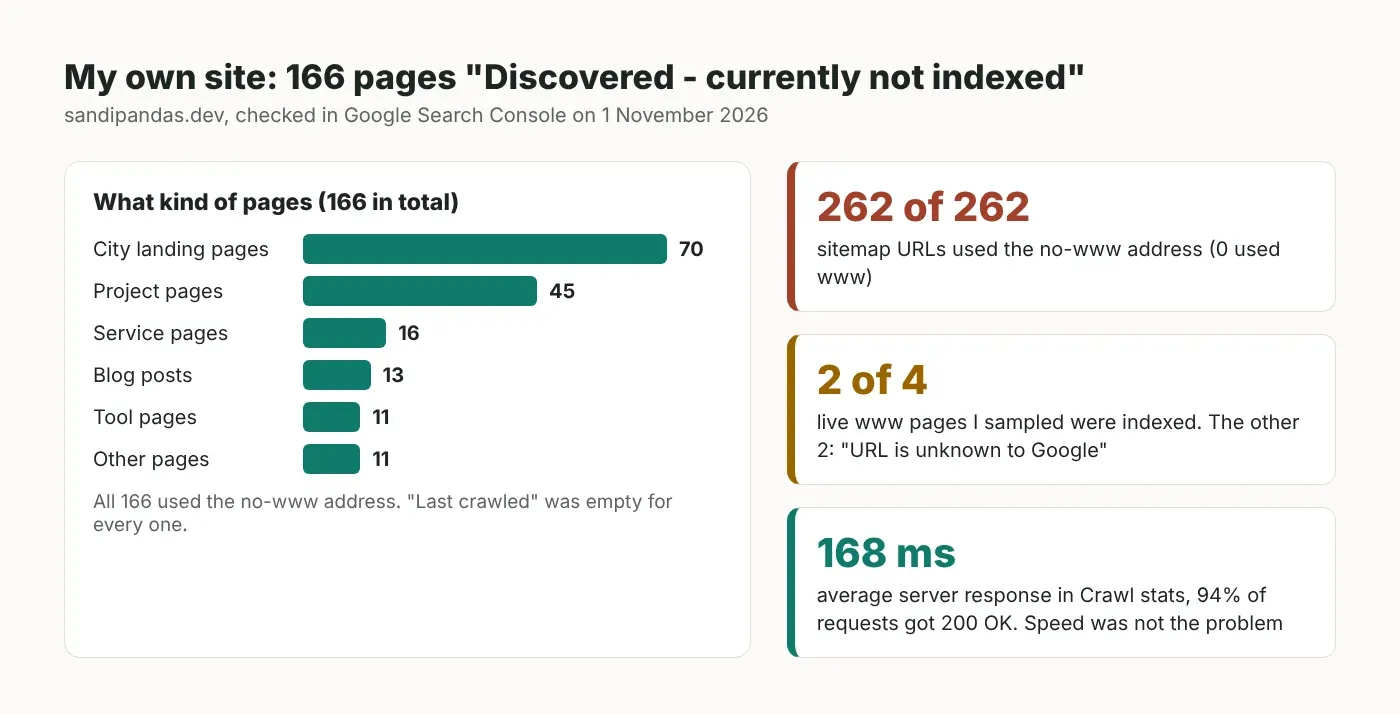
My reading of it: Google's crawl budget guide says it treats each hostname (the main part of a web address, like www.example.com) as a separate site with its own crawl budget (how much Google is able and willing to crawl). My sitemap sent Google to the no-www site. Google put those visits off, so it never followed the redirect to the www page. That is likely how some of my real pages ended up "unknown to Google".
One more thing I found: the canonical tag on my pages (the tag that tells Google which address is the main one) also points to the no-www address, while the server redirects to www. So Google gets two different answers. The fix for my site is a change in the site's code: make the sitemap, robots.txt and canonical tags all use the www address. It can't be done from the post editor, which is why it's still there as I write this. I've since looked at what this does to the "Page with redirect" row in Search Console.
First check: is the right version already indexed?
Before you fix anything, open a few URLs from the "Discovered" list in URL Inspection and check the version you actually want indexed. If that version is indexed, the "Discovered" row is just noise. If it isn't, you have a real problem.
In Search Console, open Indexing → Pages and click the "Discovered - currently not indexed" row.
Look at the example URLs. Do they use the address you want? Check www vs no www, http vs https, a trailing slash, odd ? parameters, or old URLs.
Copy the version you want (for me, the www one) into the URL Inspection bar at the top.
If it says "URL is on Google", that page is fine. If it says "URL is unknown to Google", look at "Sitemaps" under Discovery. "No referring sitemaps detected" means your sitemap is not listing that address.
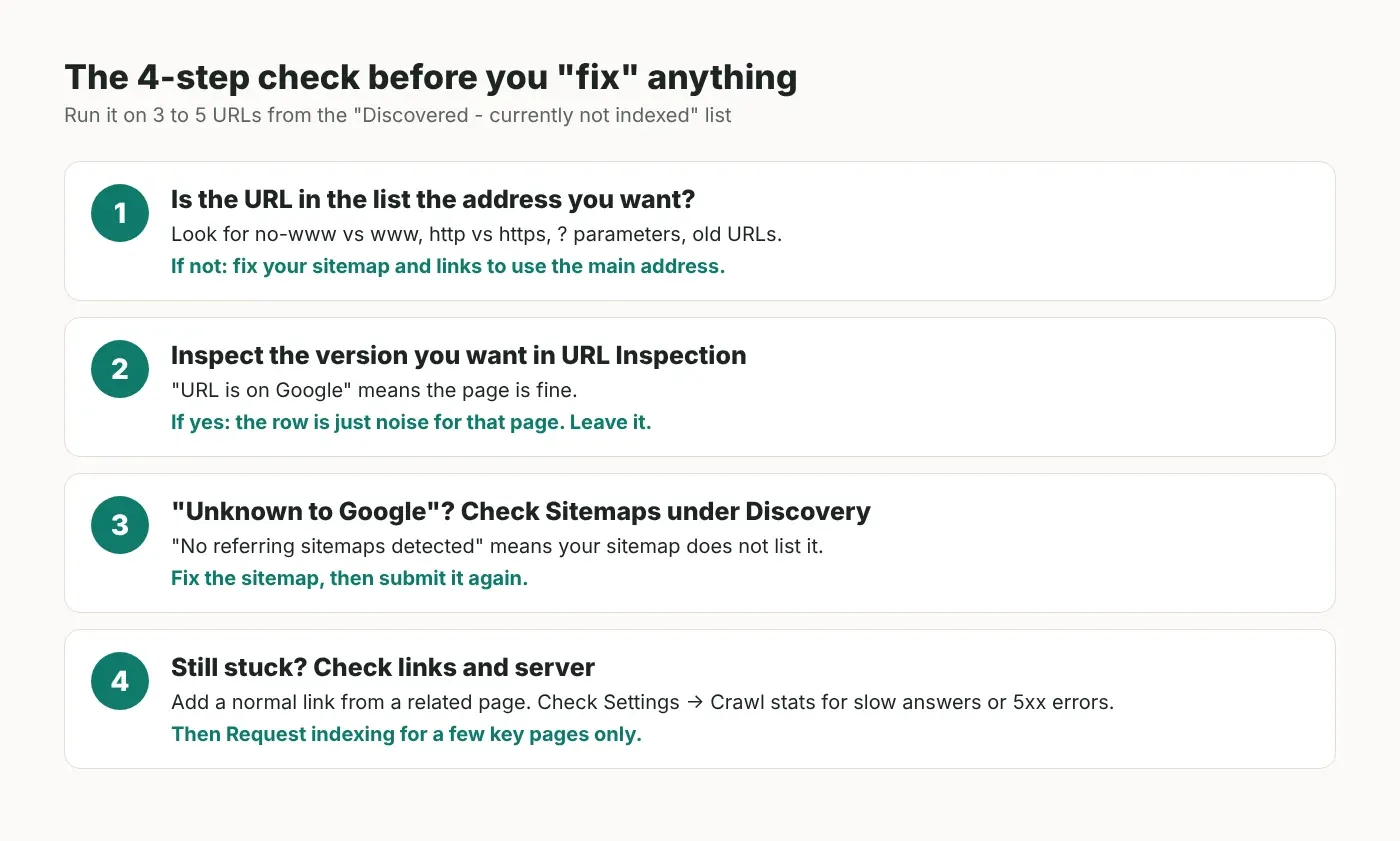
Google's help page also says you should not expect all URLs on your site to be indexed, only the main (canonical) version of each important page. So a long "Discovered" list made of duplicates, filters or old addresses is not a crisis on its own.
What causes it, according to Google
Google's docs point to two things: how much your server can take, and how much Google wants to crawl your pages. If your server is fast and rarely fails, look at what you're asking Google to crawl and how much it wants those pages.
Google's crawl budget guide is mostly written for very large sites, but it also names sites with "a large portion" of URLs in "Discovered - currently not indexed" as part of its audience. From that guide and Google's other docs, these are official:
Too many URLs that don't matter. Google says it tries to crawl most URLs it knows about, and duplicates waste that time. Google calls this "the factor that you can positively control the most".
A slow or failing server. If response times go up, or the server returns 5xx (server error) or 429 ("too many requests") answers, Google crawls less.
Low demand. Google says demand depends on things like page quality, how popular the URL is, and how often it changes.
Sitemaps with the wrong URLs. Google's sitemap guide says to use full, absolute URLs and that it "will attempt to crawl your URLs exactly as listed". It also says to list only the URLs you want in search results.
Pages with no links to them. Google's link guide says every page you care about should have a link from at least one other page on your site, as a normal <a href> link.
Widely reported, but not in the official docs: it's often said that new sites, and sites that publish lots of similar pages at once (like city landing pages), sit in "Discovered" longer. That matches what I saw, with 70 city pages in my list, but I can't prove the cause from one site.
Fix it at the source: one address everywhere
Pick the one address you want indexed, and make your sitemap, robots.txt, canonical tags and internal links all use it. Don't fix URLs one by one.
Next.js (App Router)
Next.js has built-in sitemap.ts and robots.ts files. The safe pattern is to read your site address from one environment variable (a setting kept outside your code), so the sitemap can't end up on another host. I ran this code on Next.js 16.4.3 with TypeScript 5.9 in strict mode today. It built with no errors, and the sitemap came out with full www URLs even though I set the variable with a trailing slash.
// app/lib/site.ts
// The one address you want Google to index, set per environment:
// NEXT_PUBLIC_SITE_URL=https://www.example.com
const raw = process.env.NEXT_PUBLIC_SITE_URL

if (!raw) {
  throw new Error('NEXT_PUBLIC_SITE_URL is not set')
}

// .origin drops any path or trailing slash: "https://www.example.com"
export const SITE_URL: string = new URL(raw).origin
// app/sitemap.ts
import type { MetadataRoute } from 'next'
import { SITE_URL } from './lib/site'
import { getPublishedPosts, type Post } from './lib/posts'
export default async function sitemap(): Promise<MetadataRoute.Sitemap> {
const posts: Post[] = await getPublishedPosts()
return [
{ url: `${SITE_URL}/` },
...posts.map((post: Post) => ({
url: `${SITE_URL}/blog/${post.slug}`,
// the real date the post last changed, not new Date()
lastModified: post.updatedAt,
})),
]
}// app/robots.ts
import type { MetadataRoute } from 'next'
import { SITE_URL } from './lib/site'
export default function robots(): MetadataRoute.Robots {
return {
rules: { userAgent: '*', allow: '/' },
sitemap: `${SITE_URL}/sitemap.xml`,
}
}getPublishedPosts() and the Post type (with slug and updatedAt) stand for your own data source. Replace them with your database or CMS call. The Next.js sitemap docs use new Date() in their examples, which stamps every page with the build time. Google's sitemap guide says <lastmod> should show the last real change, so use the real date. On my own sitemap, 34 of 36 page entries showed today's date, which usually means the date is set at build time.
WordPress
Since WordPress 5.5, core makes a sitemap at /wp-sitemap.xml and adds it to robots.txt (unless "Discourage search engines" is turned on), and it builds that address with home_url(). That comes from Settings → General → Site Address (URL). Set it to the exact address you want (with or without www, always https), and the core sitemap follows. If you use an SEO plugin's sitemap instead, check its sitemap file after the change. If your host locks that field, it's set by WP_HOME in wp-config.php, as the WordPress settings guide explains.
Then, on any platform: make the other address send visitors to the main one with a single permanent (301) redirect, set the canonical tag to the main address, submit the new sitemap in Search Console, and remove the old sitemap entry if it lists the wrong host.
If you'd like me to look at your Page indexing report with you, my website audit covers exactly this.
When "Request indexing" helps, and when it doesn't
Use "Request indexing" for a handful of important pages after you've fixed the cause. It is not a fix for hundreds of URLs.
Google's recrawl guide says there is a quota (a limit) for single URLs, that asking many times for the same URL "won't get it crawled any faster", and that crawling "can take anywhere from a few days to a few weeks". For lots of URLs, it says to submit a sitemap.
After the fix, you can click "Validate fix" on the row. Google's help page says validation "typically takes up to about two weeks", sometimes longer. Note the Source column says "Google systems" for this row, so the count may move on its own as Google recrawls.
What's easy to get wrong
Treating the row as an error. Check the right version in URL Inspection first. It may already be indexed.
Clicking "Request indexing" again and again. Google says it won't speed things up.
A sitemap on a different host. Your site can show www in the browser while the sitemap quietly lists the other address. Open the sitemap file and read the <loc> lines.
Using noindex to "save" crawl budget. Google's guide says not to: it still has to fetch the page to see noindex.
Fake lastmod dates. Google's sitemap guide says lastmod should show the last real change. If every page says "changed today", that's not true.
Blaming the server first. Check Crawl stats (Settings → Crawl stats). Mine averaged 168 ms with almost no errors, so speed was not my problem.
Before you fix "Discovered", check which address Google found. On my site, all 166 were the wrong one.
Read next
If you'd rather have someone do this
My team and I have done 900+ projects since 2017, and indexing problems like this one come up a lot. If you want us to find the cause and fix it on your site, book a short call.
Questions
Questions this post answers
How long does "Discovered - currently not indexed" take to clear?
- There is no fixed time. Google's recrawl guide says crawling can take anywhere from a few days to a few weeks, and its help page says a fix validation typically takes up to about two weeks, sometimes longer. The count also changes only when Google crawls those pages again, so checking once a week is enough.
Is "Discovered - currently not indexed" bad for SEO?
- Not by itself. Google says you shouldn't expect every URL to be indexed, only the main version of each important page. It only hurts when pages you want in search are stuck there. Check those pages, in the version you want, with URL Inspection. If they show "URL is on Google", you can leave the row alone.
Does "Request indexing" fix discovered not indexed pages?
- For a few important pages, it asks Google to crawl them, which is useful after a fix. But Google says there is a quota for single URLs, and asking again for the same URL won't make it faster. If hundreds of URLs are affected, fix the cause first, such as wrong sitemap URLs or weak internal links, then submit the sitemap again.
What is the difference between discovered and crawled currently not indexed?
- "Discovered" means Google knows the URL but hasn't visited it yet, so "Last crawled" is empty. "Crawled" means Google visited the page and chose not to index it for now. The first usually points to sitemap, linking or crawl-demand problems across the site. The second often points to the page itself, such as thin or duplicate content.
Should I remove discovered URLs from my sitemap?
- Remove the ones that shouldn't be in search: duplicates, old addresses, redirects, filters and test pages. Google's sitemap guide says to list only the URLs you want in search results, as full absolute URLs. Keep the important pages in, using the exact address you want indexed, and make sure each one also has a normal link from another page on your site.