SEO for Developers
Alternate page with proper canonical tag: when to fix it
3 of my own pages sat in this row. Here's what Google actually did with them.

Search Console told me three of my pages were fine as "alternate" copies, yet all three were the exact pages my visitors land on.
So "Alternate page with proper canonical tag" isn't always good news, and the two "Duplicate" rows next to it mean something quite different. Here you'll get all three side by side, a two-minute check in URL Inspection, my own site's results from today, and the fix in Next.js and WordPress.
Alternate page with proper canonical tag vs duplicate: which one needs fixing?
"Alternate page with proper canonical tag" is usually fine: the page names another URL as the main one, and Google agreed. "Duplicate without user-selected canonical" means you named no main URL, so Google picked one. "Duplicate, Google chose different canonical than user" means Google ignored your choice. Check the two duplicates first.
A canonical is the main version of a page. The same content often lives at more than one address: with and without www, or with something like ?page=2 or ?utm_source=facebook on the end. You add a small tag in the page's code, <link rel="canonical">, that names the one address you want Google to show. Google's canonicalization guide calls this "a hint, not a rule". Google weighs it along with other signals: redirects (automatic jumps from one address to another), your sitemap (the file that lists your pages for Google) and HTTPS (the secure version of your address).
All three sit under "Why pages aren't indexed" in the Page indexing report. That sounds bad, but the same help page says a page marked duplicate or alternate is usually a good thing. What matters is whether the right copy got indexed.
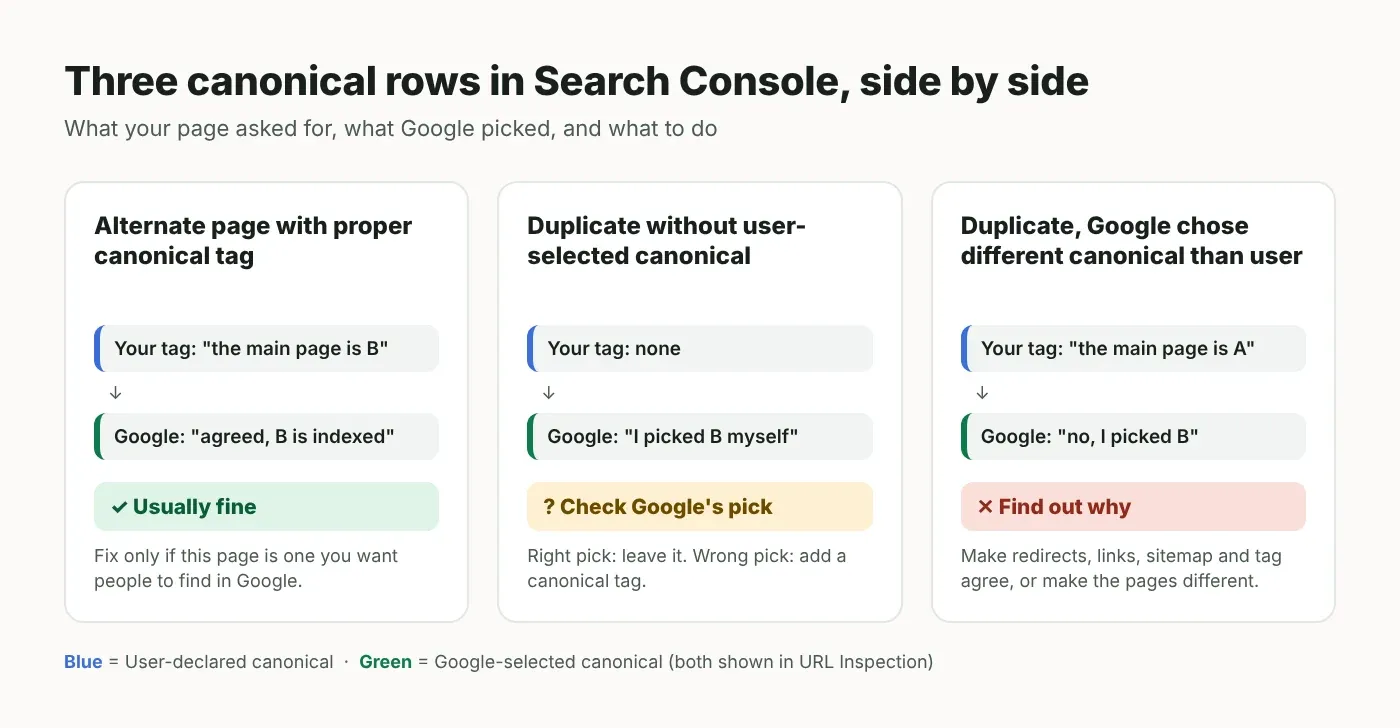
Status in Search Console | What it means | Your move |
|---|---|---|
Alternate page with proper canonical tag | This URL names another URL as the main one, and Google agrees. Google's help page says there's nothing you need to do | Leave it, unless the listed URL is a page you want people to find |
Duplicate without user-selected canonical | No canonical tag, so Google picked the main page itself | Check Google's pick. If it's wrong, add a canonical tag |
Duplicate, Google chose different canonical than user | You named a main URL. Google thinks another URL is better, and indexed that one | Find out why, and make all your signals point to one URL |
How to tell what Google did: two lines in URL Inspection
Inspect one of the listed URLs and compare two lines: "User-declared canonical" (the URL your page asks for) and "Google-selected canonical" (the URL Google picked). If the main URL is the one you want and it's indexed, you're done. If not, you have work to do.
In Search Console, open Indexing → Pages and click the row, for example "Alternate page with proper canonical tag".
Copy a URL from the Examples list at the bottom and paste it into the search bar at the very top. That opens URL Inspection (Google's own record of that one URL).
Click "Page indexing" to open the details. Under "Indexing" you'll see "User-declared canonical" and "Google-selected canonical".
If Google-selected says "Inspected URL", Google treats this page as the main one. If it shows another address, inspect that address too and check it is indexed.
Note "Last crawl" (when Googlebot, Google's crawler, last fetched the page) and compare it with "Last update" at the top right of the report. If the crawl is newer, trust URL Inspection over the report.
One official limit matters here. Google's URL Inspection help says the live test ("Test live URL") can't predict the canonical; only the indexed data shows it. So you can't confirm a canonical fix with the live test. You wait for Google to crawl the page again.
What I found on my own site (4 November 2026)
My report listed 3 "Alternate" pages and 1 "Duplicate without user-selected canonical", and no "Google chose different" pages. All 3 alternates were www pages whose canonical tag pointed at the no-www address. When I inspected them today, Google had sided with my tag on two and ignored it on one.
The report's last update was 23 October 2026. I inspected every listed URL today, plus the no-www versions.
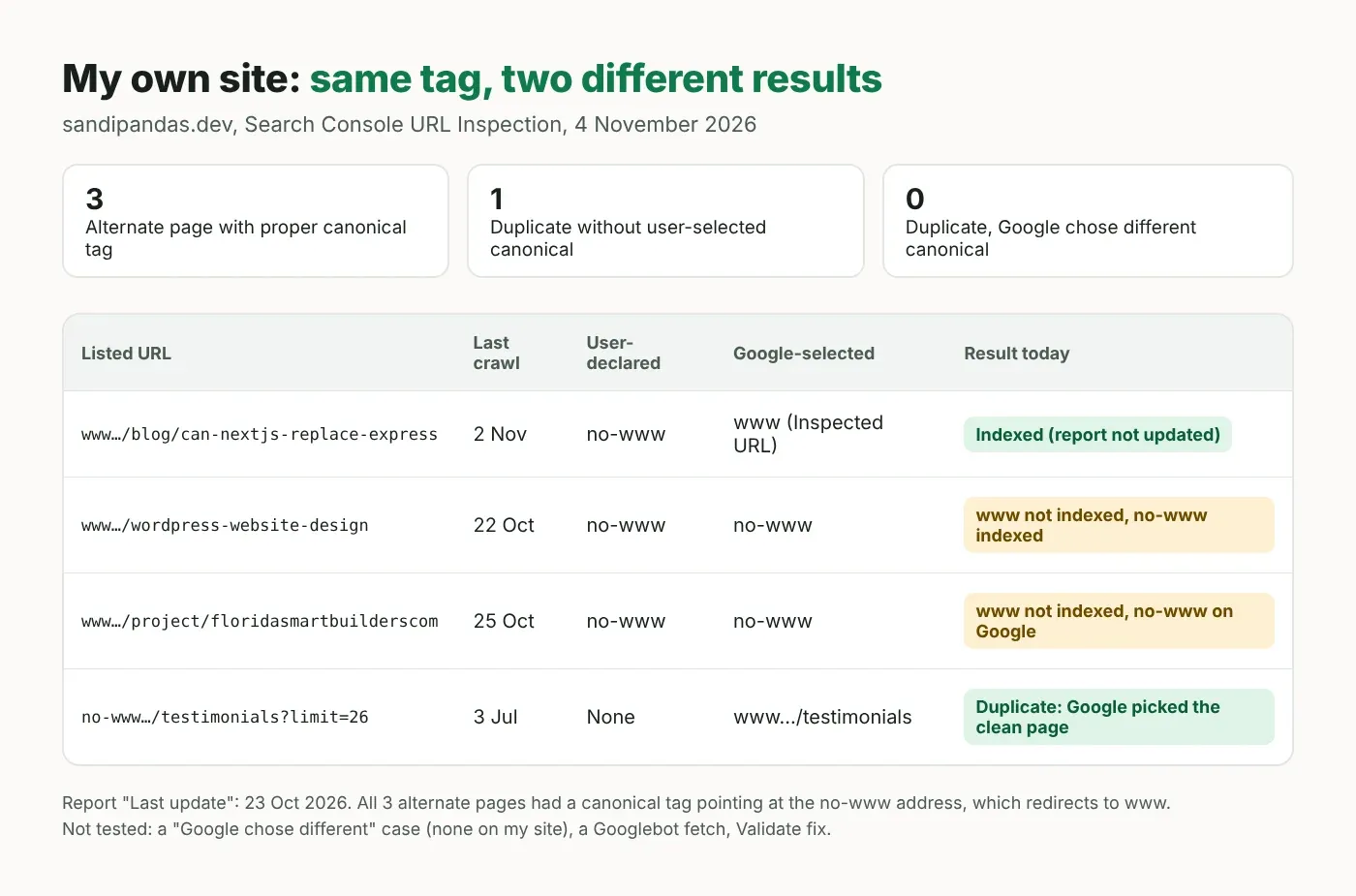
Listed page | What URL Inspection showed | Result today |
|---|---|---|
Blog post: can Next.js replace Express (www) | Crawled 2 Nov 2026. My tag: no-www. Google's pick: this www page | Indexed. The report hasn't caught up |
WordPress website design page (www) | Crawled 22 Oct 2026. My tag: no-www. Google's pick: no-www | www not indexed. The no-www URL is indexed instead |
Florida Smart Builders project page (www) | Crawled 25 Oct 2026. My tag: no-www. Google's pick: no-www | www not indexed. The no-www URL is on Google |
Testimonials list with ?limit=26 (no-www) | Crawled 3 Jul 2026. My tag: none. Google's pick: the www testimonials page | Duplicate. Google picked the clean page itself |
Here's what that tells me:
Nothing went missing. Each page is in Google under one address or the other. My no-www addresses send people on to the www page with a redirect (an automatic jump to another address), so visitors still land in the right place.
But two pages show in Google under an address that redirects. My own tag asked for that. I wrote about why that's a problem in my post on "Page with redirect".
Same setup, two different results. All three pages have the same kind of tag, yet Google picked www for one and no-www for two. That's "a hint, not a rule" in real life.
The duplicate was harmless. ?limit=26 is a longer version of my testimonials list. In July it had no canonical, so Google chose the clean page itself. It has a canonical tag now, but Google hasn't crawled it since July.
What I didn't test: I had no "Google chose different canonical than user" case, so that part of this post comes from Google's documentation only. I checked 4 URLs on one site with Google's own URL Inspection, not a fake Googlebot visit, and I didn't click "Validate fix". The fix for my site is to make the canonical tags use the www address. That needs a change in my site's code, and it isn't live as I write this, so these numbers are the "before".
If you'd rather not go through each URL by hand, my team's website audit checks the canonical tag on every page and tells you which rows actually matter.
How to fix each of the three
Fix the cause, not the row. For alternates, only check the main URL is the right one. For "without user-selected canonical", add canonical tags. For "Google chose different", make every signal point at the same URL, or make the pages clearly different.
Alternate page with proper canonical tag
Leave it when the listed URL really is a copy: a link with ?utm_source= on the end, a sorted or filtered list, the no-www version of a page, or an AMP version (a stripped-down mobile page) or mobile version, which are Google's own examples.
Fix it when the listed URL is a page you want people to find. Its canonical tag is pointing at the wrong page. Common causes: a shared template that prints the same canonical on every page, a canonical that points to the home page, or one that points to the other www/no-www version, like mine.
Duplicate without user-selected canonical
Inspect it and look at Google's pick. If it's the page you'd choose, leave it. Google calls this "working as intended".
If the pick is wrong, add a canonical tag to the copies that names the main page. Also give the main page a canonical that names itself. Google's guide to duplicate URLs recommends this "self-referential" canonical.
If the two pages shouldn't be duplicates at all, make their content clearly different. That's Google's own advice for this row.
Duplicate, Google chose different canonical than user
Google's help says this means it thinks your page isn't a duplicate of the URL you named, and a duplicate must be similar to its canonical. So first check the two pages really show the same content.
Then make your signals agree. Redirects should lead to your canonical URL. Your own links should use it (Google says to link to the canonical URL rather than a duplicate). Your sitemap should list it, and it should be the HTTPS version, which Google prefers.
Don't use robots.txt (the file that tells crawlers what they may fetch) or the URL removal tool to sort out duplicates. Google says not to, and also not to name different canonicals for the same page in different ways.
Setting canonical tags in Next.js and WordPress
In Next.js, set metadataBase (your site's base address) once in the root layout (the file that wraps every page) and set the canonical in each page, never in the layout. In WordPress, core (WordPress itself, without plugins) adds a canonical to single posts and pages from the permalink (the post's full address), so check the Site Address in Settings → General and make sure only one tag is printed.
Next.js (App Router)
In the App Router (the app/ folder way of building Next.js sites), Next.js merges metadata (the title, description and tags in the page's <head>) from layouts and pages. The generateMetadata docs explain that a page which doesn't set a field takes it from the layout above it. So if you put alternates.canonical: '/' in your root layout (the file that wraps every page), every page that doesn't set its own canonical tells Google "my main version is the home page". Google may then ignore the tag, or treat your pages as copies of the home page.
// app/layout.tsx — the mistake (part of the file, don't copy this)
export const metadata: Metadata = {
  metadataBase: new URL(SITE_URL),
  alternates: { canonical: '/' }, // every page without its own canonical gets this one
}
The fix: keep only metadataBase (the base address that short paths are added to) in the layout, read the address from one setting, and give each page its own canonical.
// lib/site.ts — checked on Next.js 16.4.5, TypeScript 5.9.3 (strict)
// The one address your site answers on WITHOUT a redirect,
// e.g. https://www.example.com (set it in .env.local and in your host's settings).
const raw = process.env.NEXT_PUBLIC_SITE_URL

if (!raw) {
  throw new Error('Set NEXT_PUBLIC_SITE_URL, for example https://www.example.com')
}

export const SITE_URL: string = raw.replace(/\/+$/, '')
// app/layout.tsx — checked on Next.js 16.4.5, React 19.3.1
import type { Metadata } from 'next'
import type { ReactNode } from 'react'
import { SITE_URL } from '@/lib/site'
export const metadata: Metadata = {
metadataBase: new URL(SITE_URL),
title: { default: 'Example', template: '%s | Example' },
}
export default function RootLayout({ children }: { children: ReactNode }) {
return (
<html lang="en">
<body>{children}</body>
</html>
)
}// app/blog/[slug]/page.tsx — checked on Next.js 16.4.5, TypeScript 5.9.3 (strict)
import type { Metadata } from 'next'
type Props = {
params: Promise<{ slug: string }>
}
export async function generateMetadata({ params }: Props): Promise<Metadata> {
const { slug } = await params
return {
title: slug.replace(/-/g, ' '),
// Relative path + metadataBase = full address on your one host.
// searchParams are not used, so ?utm_source=... still gets the clean canonical.
alternates: { canonical: `/blog/${slug}` },
}
}
export default async function Post({ params }: Props) {
const { slug } = await params
return <h1>{slug}</h1>
}Set NEXT_PUBLIC_SITE_URL in .env.local (the settings file on your computer) and in your hosting settings to the one address your site answers on without a redirect (www or not). I built a test app with both versions and fetched each page:
Next.js 16.4.5 test build, NEXT_PUBLIC_SITE_URL=https://www.example.com

BEFORE (canonical in the root layout)
/about                      <link rel="canonical" href="https://www.example.com"/>

AFTER (canonical in each page)
/                           <link rel="canonical" href="https://www.example.com"/>
/about                      <link rel="canonical" href="https://www.example.com/about"/>
/blog/my-post               <link rel="canonical" href="https://www.example.com/blog/my-post"/>
/blog/my-post?utm_source=x  <link rel="canonical" href="https://www.example.com/blog/my-post"/>
/testimonials?limit=26      <link rel="canonical" href="https://www.example.com/testimonials"/>
WordPress
WordPress core prints a canonical tag on single posts and pages through rel_canonical() (since version 2.9.0). It builds the address from the post's permalink (its full address) with wp_get_canonical_url(). It doesn't print one on other pages, such as category archives.
The permalink starts with your Site Address. In Settings → General, the WordPress docs describe "Site Address (URL)" as the address people type to reach your site. Make it the exact version your site answers on, https, with or without www. If the field is greyed out, it's set in wp-config.php (WordPress's main settings file) with WP_HOME.
An SEO plugin may replace core's tag with its own. View the page source and search for rel="canonical": you should find exactly one, with the full address.
Check your own pages with a small script
This script follows redirects, reads the canonical in the HTML and in the HTTP header (extra lines the server sends before the page itself), and flags pages where it's missing, doubled, pointing at a redirect, or pointing at another page. It checks your tags before Google recrawls. It can't tell you what Google will pick; only URL Inspection shows that.
Google's duplicate URL guide says it supports a canonical sent this way too, for web search results.
// scripts/check-canonical.ts — checked on Node.js 22.23, TypeScript 5.9.3 (strict)
// Usage: node scripts/check-canonical.ts https://www.example.com/ https://www.example.com/about
// Needs Node 22.18+ (runs .ts files directly). Reads the canonical in the HTML <head>
// and in the Link HTTP header. It does not run JavaScript.

type Result = {
  url: string
  finalUrl: string
  status: number
  canonicals: string[]
  verdict: string
}

async function follow(url: string): Promise<{ finalUrl: string; status: number; html: string; linkHeader: string }> {
  let current = url
  for (let hop = 0; hop < 10; hop++) {
    const res = await fetch(current, { redirect: 'manual' })
    const location = res.headers.get('location')
    if (res.status >= 300 && res.status < 400 && location) {
      current = new URL(location, current).href
      continue
    }
    return { finalUrl: current, status: res.status, html: await res.text(), linkHeader: res.headers.get('link') ?? '' }
  }
  throw new Error(`More than 10 redirects: ${url}`)
}

function findCanonicals(html: string, linkHeader: string, base: string): string[] {
  const head = html.split(/<\/head>/i)[0] ?? ''
  const tags = head.match(/<link\b[^>]*>/gi) ?? []
  const fromHtml = tags
    .filter((tag) => /\brel=["']?canonical["']?/i.test(tag))
    .map((tag) => tag.match(/\bhref=["']([^"']+)["']/i)?.[1] ?? '')
  const fromHeader = linkHeader
    .split(',')
    .filter((part) => /rel="?canonical"?/i.test(part))
    .map((part) => part.match(/<([^>]+)>/)?.[1] ?? '')
  return [...fromHtml, ...fromHeader]
    .filter((href) => href !== '')
    .map((href) => new URL(href, base).href)
}

async function check(url: string): Promise<Result> {
  const page = await follow(url)
  const canonicals = findCanonicals(page.html, page.linkHeader, page.finalUrl)
  const base: Result = { url, finalUrl: page.finalUrl, status: page.status, canonicals, verdict: '' }

  if (page.status !== 200) return { ...base, verdict: `page returns ${page.status}` }
  if (canonicals.length === 0) return { ...base, verdict: 'NO CANONICAL - Google will pick one' }
  if (new Set(canonicals).size > 1) return { ...base, verdict: 'MORE THAN ONE CANONICAL - remove extras' }

  const canonical = canonicals[0]
  const target = await fetch(canonical, { redirect: 'manual' })
  if (target.status >= 300 && target.status < 400) {
    return { ...base, verdict: `CANONICAL REDIRECTS (${target.status}) - point it at the final URL` }
  }
  if (target.status !== 200) return { ...base, verdict: `CANONICAL RETURNS ${target.status}` }

  const final = new URL(page.finalUrl)
  if (canonical === final.href) return { ...base, verdict: 'OK - points to itself' }
  if (final.search !== '' && canonical === `${final.origin}${final.pathname}`) {
    return { ...base, verdict: 'OK - points to the same page without the ?query' }
  }
  return { ...base, verdict: 'POINTS TO ANOTHER PAGE - fine only if that is on purpose' }
}

async function main(): Promise<void> {
  const urls = process.argv.slice(2)
  if (urls.length === 0) {
    console.error('Give one or more full URLs')
    process.exit(1)
  }
  for (const url of urls) {
    try {
      const r = await check(url)
      console.log(`${r.url}\n  final: ${r.finalUrl} (${r.status})\n  canonical: ${r.canonicals.join(', ') || '-'}\n  ${r.verdict}\n`)
    } catch (error) {
      console.log(`${url}\n  ERROR: ${(error as Error).message}\n`)
    }
  }
}

main()
Run it with node scripts/check-canonical.ts https://www.example.com/ https://www.example.com/about. Here's what it printed against my test app, where I planted each mistake on purpose:
http://localhost:3300/about
  final: http://localhost:3300/about (200)
  canonical: http://localhost:3300/
  POINTS TO ANOTHER PAGE - fine only if that is on purpose

http://localhost:3300/testimonials?limit=26
  final: http://localhost:3300/testimonials?limit=26 (200)
  canonical: http://localhost:3300/testimonials
  OK - points to the same page without the ?query

http://localhost:3300/promo
  final: http://localhost:3300/promo (200)
  canonical: http://localhost:3300/old-promo
  CANONICAL REDIRECTS (308) - point it at the final URL

http://localhost:3300/twice
  final: http://localhost:3300/twice (200)
  canonical: http://localhost:3300/, https://www.example.com/a, https://www.example.com/b
  MORE THAN ONE CANONICAL - remove extras
It doesn't run JavaScript, so it won't see a canonical added by a script after the page loads. A small difference like a trailing slash (/about/ vs /about) also shows as "another page", so check those by eye.
What's easy to get wrong
Reading "Alternate" as always good. It's good only when the page it points to is the page you want people to find.
Trusting the report over URL Inspection. My report was 12 days old, and one of the three pages had already changed.
Checking a canonical fix with "Test live URL". Google says the live test can't predict the canonical. Wait for a recrawl.
Putting the canonical in a shared layout or theme header. Every page ends up naming the same main page.
Pointing the canonical at an address that redirects. Your tag and your redirect then say opposite things.
Expecting the row to clear the next day. Google's validation help says validation typically takes up to about two weeks, and sometimes much longer.
An "alternate" page is only good news when the page it points to is the one you want people to find.
Read next
Open Graph tags: fix a link preview showing the wrong image (og:url and the canonical should match)
If you'd rather have someone do this
I've been building and fixing websites since 2017, with more than 900 projects done alongside my team in Kolkata. If you'd rather hand your Page indexing report to someone, book a short call and we'll go through it with you, row by row.
Questions
Questions this post answers
Does "Alternate page with proper canonical tag" hurt SEO?
- Not by itself. Google's help page says the page points to the canonical page, which is indexed, so there's nothing you need to do. It only hurts when the listed page is one you want in search, because then its canonical tag is pointing at the wrong page. Inspect a few listed URLs and check the main version they point to is the page you'd choose.
What does "Duplicate without user-selected canonical" mean?
- Google found two or more pages with the same content, and none of them named a main version with a canonical tag. So Google picked one itself and left the others out of search. Google calls this working as intended. Inspect the URL to see its pick. If the pick is wrong, add a canonical tag that names the page you want.
Why did Google choose a different canonical than mine?
- A canonical tag is a hint, not a rule, so Google also weighs redirects, your own links, sitemaps, HTTPS and the content itself. Google's help says this status means it thinks your page isn't a duplicate of the URL you named. Check the two pages really match, then make redirects, links, sitemap and canonical all point to the same address.
How do I add a canonical tag in Next.js?
- In the App Router (the app/ folder setup), set metadataBase (your site's base address) once in app/layout.tsx, the file that wraps every page. Then return alternates: { canonical: '/your-path' } from each page's metadata or generateMetadata. Don't put the canonical in the layout: pages that don't set their own take it from there and all point to the same page. Read the site address from your .env settings file, not a domain typed into the code.
How long until Search Console shows my canonical fix?
- Only after Google crawls the page again. URL Inspection updates first; the Page indexing report can be days behind (mine was 12 days old). If you click Validate fix, Google's help says validation typically takes up to about two weeks, and sometimes much longer. The live test can't show the canonical, so don't use it to check the fix.