SEO for Developers
Page with redirect in Search Console: fix it or ignore it?
49 of my own URLs sit in this row. Here is the one kind that needed fixing.


Search Console says 49 of my URLs are "not indexed" because of a redirect. When I checked the pages those redirects lead to, all 7 I tested were already on Google.
So "Page with redirect" is often nothing to fix. But on my site it was hiding a real problem: my own tags were pointing Google at the wrong address. This post gives you a 3-question check to sort your list, a small script that finds the redirects that matter, and the fix in Next.js and WordPress.
What does "Page with redirect" mean in Search Console?
It means Google found a URL that sends visitors on to a different URL, so it didn't index the first one. That's normal. Google indexes the page at the end of the redirect instead. Act only if the redirect is a mistake, the final page isn't indexed, or your sitemap, canonical tags or links still use the old URL.
A redirect is when one web address automatically sends you to another. The server sends a short code with it: 301 or 308 means the move is permanent, and 302, 303 or 307 means it's temporary. Google's Page indexing report help describes this row as "a non-canonical URL that redirects to another page", and says the target "might or might not be indexed, depending on what Google thinks about that target URL." ("Canonical" means the main version of a page, the one you want Google to show.)
The same page says "Redirect URLs are not indexed, only the redirect target," and "Don't expect every URL on your site to be indexed."
What I found in my own report (3 November 2026)
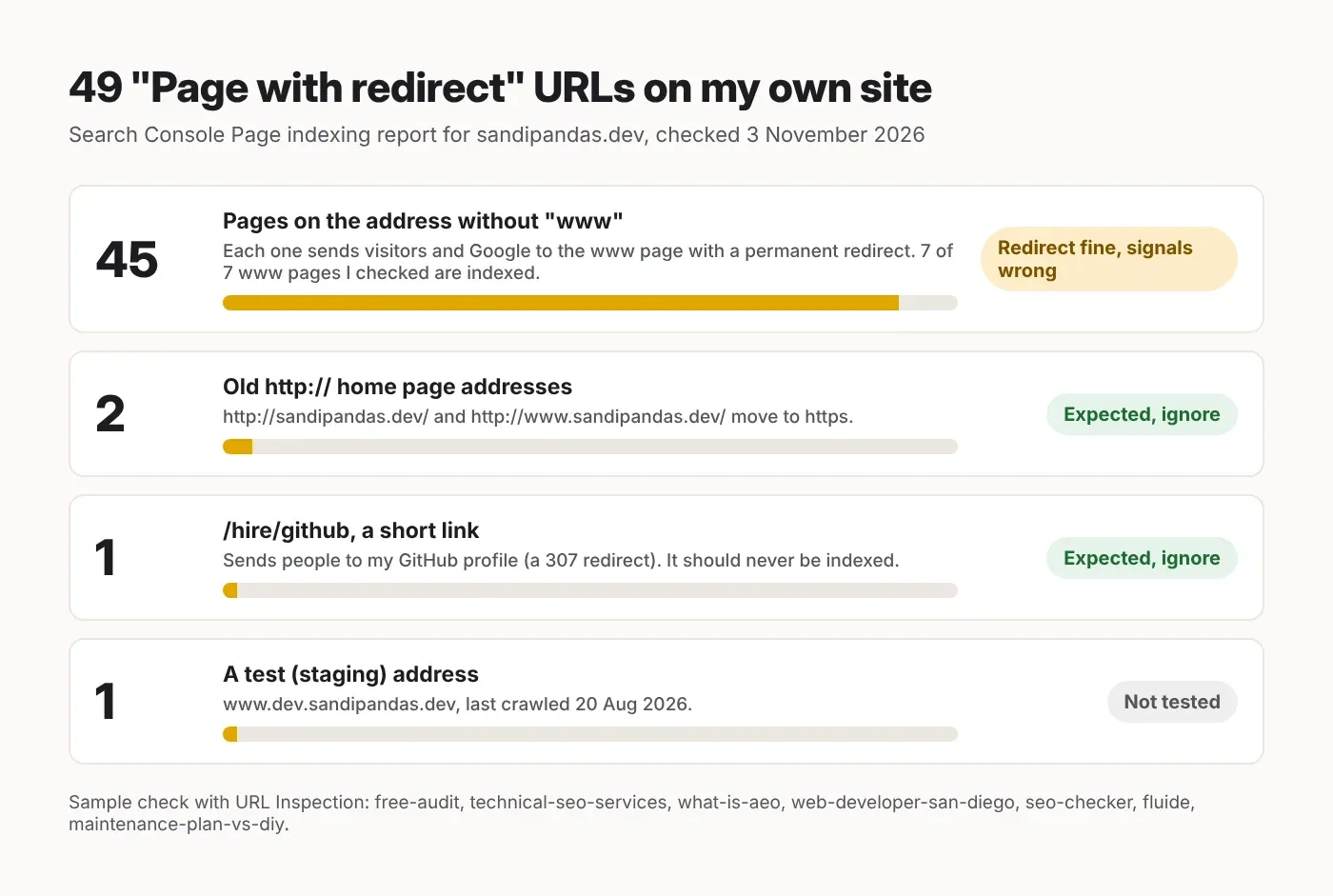
45 of my 49 redirect URLs were the no-www version of real pages. The redirects worked, and all 7 www pages I checked were indexed. The real problem was my own canonical tags, which sent Google back to the address that redirects.
I opened Indexing → Pages → "Page with redirect" for sandipandas.dev today. The row shows 49 URLs, with Source: Website. The count stayed in single digits from August to early October, then jumped to 49 by the report's last update on 23 October 2026. I don't know why, so I won't guess.
Check | Tool | Result |
|---|---|---|
What's in the row | Page indexing report, all 49 example URLs | 45 no-www https pages, 2 http:// home page addresses, 1 short link (/hire/github), 1 staging address (a test copy of the site) |
Where a no-www page goes | Facebook Sharing Debugger (it lists every step, or "hop", of a redirect) | From http and no www: 308 to https (still no www), then 308 to the www page. 2 hops |
Are the www pages indexed? | URL Inspection, 7 pages | 7 of 7 "Page is indexed" |
What Google says about the no-www URL | URL Inspection on the no-www free-audit URL | "Page is not indexed: Page with redirect". Referring page (where Google found the link): the www page itself |
Which address my page asks for | URL Inspection and page source of the www free-audit page | User-declared canonical: the no-www address. Google-selected canonical: the www address |
The short link | Facebook Sharing Debugger | /hire/github → 307 → my GitHub profile |
What I did not test: I couldn't fetch the pages as Googlebot (Google's crawler) from my own tools, so the status codes above come from Facebook's crawler, a different bot. Google's URL Inspection report doesn't show the code. I checked 7 of the 45 www pages, not all of them, and I didn't test the staging address. This is one site, so treat it as one real example, not a rule.
Should you fix "Page with redirect" or ignore it?
Ignore it when you meant to redirect and the final page is indexed. Fix it when the redirect is a mistake, or when your sitemap, canonical tags or internal links still point at the old URL.
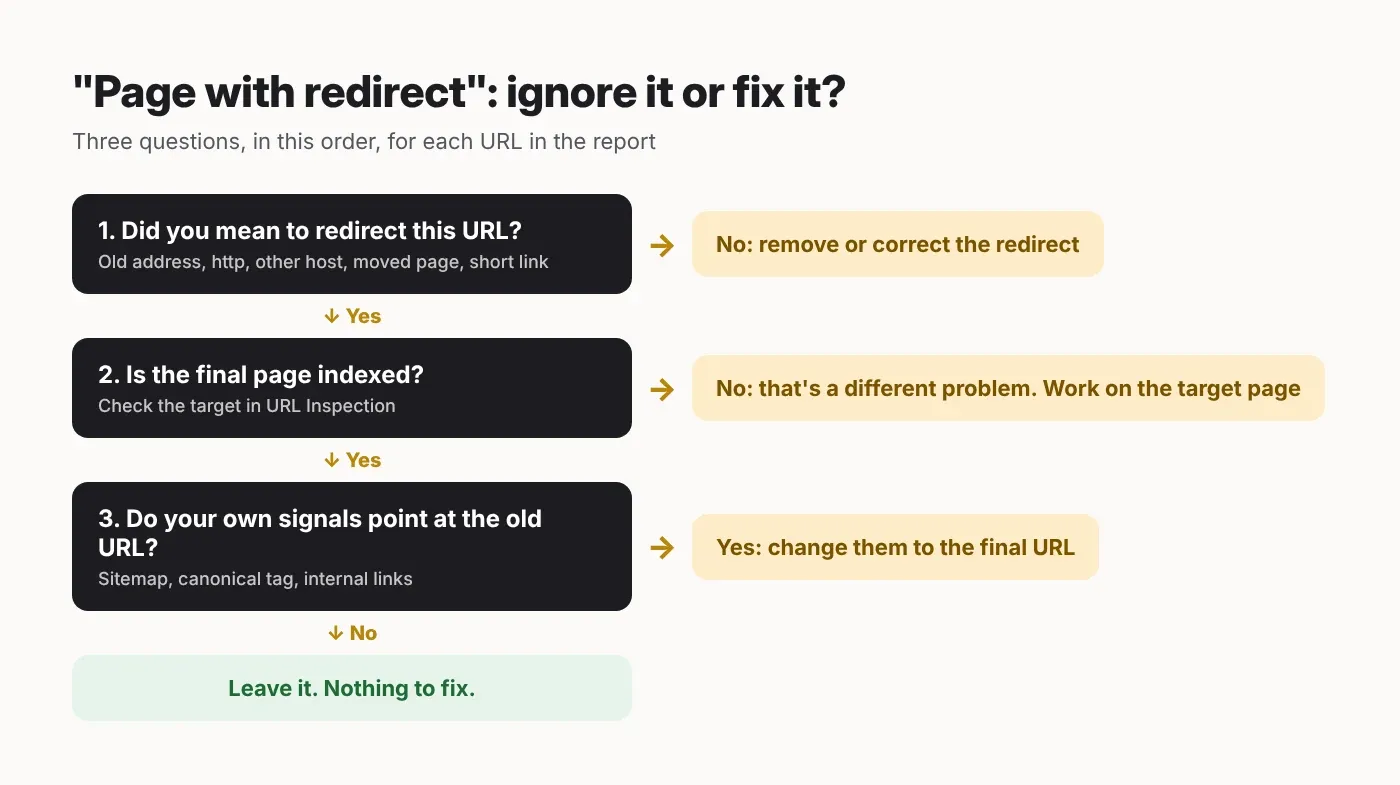
Ask these three questions, in this order, for each URL in the list:
Did you mean to redirect it? http to https, no-www to www (or the other way), an old page that moved, a short link. If yes, the redirect is doing its job. If a real page redirects by mistake, remove or correct the redirect.
Is the final page indexed? Paste the target URL into URL Inspection. "URL is on Google" means you're fine. If it isn't indexed, the problem is on the target page, not the redirect.
Do your own signals still use the old URL? Check your sitemap (the file that lists the pages you want Google to find), the canonical tag on each page, and the links between your pages. If any of them use the redirecting address, change them to the final one.
On my list, the 2 http:// addresses and /hire/github pass all three, so I leave them alone. The 45 no-www pages fail question 3. If you'd like a second pair of eyes on your own report, my website audit covers exactly this.
The hidden problem: a canonical tag that points to a redirect
If a page says "my main address is X", and X redirects straight back to that page, you're giving Google two different answers. Google picked the right one on my site, but you shouldn't leave that to chance.

On my free audit page, the www page loads fine, but its canonical tag points to the no-www address, which redirects back to www. Google listed my "user-declared canonical" and chose the www page anyway.
Google's guide to duplicate URLs calls both redirects and canonical tags "a strong signal". It also says: "Don't specify different URLs as canonical for the same page using different canonicalization techniques." That's exactly what my site does right now. And for links between your own pages, it says to "link to the canonical URL rather than a duplicate URL."
My reading of it: Google keeps finding these no-www URLs because my own pages and sitemap list them. URL Inspection names the www page as the "referring page" (where Google found the link), which fits. But that's my guess from one URL, not something Google states. The fix for my site needs a change in the site's code, which I can't make from the post editor, so the page you're reading has the same issue as I write this. I've since checked how the same tags show up in the "Alternate page with proper canonical tag" row.
How to find the redirects that matter on your site
Check two lists: every URL in your sitemap, and the canonical tag of every page in it. A redirect in either list is one you sent Google to yourself, so change it to the final URL.
I wrote this small script for that. It reads your sitemap (or sitemap index, a file that lists several sitemaps), follows each URL one hop at a time, and reads each page's canonical tag. I ran it today on Node.js 22.23 against a test Next.js 16.4.4 app where I planted three mistakes: a moved page left in the sitemap, a canonical tag pointing at that moved page, and a page that picked up the home page's canonical by accident.
// scripts/check-redirects.ts — checked on Node.js 22.23, TypeScript 5.9.3 (strict)
// Checks every URL in a sitemap (or sitemap index) for redirects, and checks
// that each page's canonical tag points to a URL that does not redirect.
// Run: node scripts/check-redirects.ts https://www.example.com/sitemap.xml
// Needs Node.js 22.18 or newer, which can run .ts files directly.

type Hop = { url: string; status: number }

const MAX_HOPS = 10 // Google's crawlers follow up to 10 redirect hops

async function getHops(start: string): Promise<Hop[]> {
  const hops: Hop[] = []
  let url = start
  for (let i = 0; i <= MAX_HOPS; i++) {
    const res = await fetch(url, { redirect: 'manual' })
    hops.push({ url, status: res.status })
    const location = res.headers.get('location')
    if (res.status < 300 || res.status > 399 || !location) return hops
    url = new URL(location, url).href // Location can be relative
  }
  return hops
}

async function getLocs(sitemapUrl: string): Promise<string[]> {
  const hops = await getHops(sitemapUrl)
  if (hops.length > 1) {
    console.log(`SITEMAP REDIRECTS: ${sitemapUrl} -> ${hops[hops.length - 1].url}`)
  }
  const xml = await (await fetch(sitemapUrl)).text()
  const locs = [...xml.matchAll(/<loc>\s*([^<\s]+)\s*<\/loc>/g)].map((m) => m[1])
  if (/<sitemapindex/i.test(xml)) {
    const all: string[] = []
    for (const child of locs) all.push(...(await getLocs(child)))
    return all
  }
  return locs
}

function readCanonical(html: string, pageUrl: string): string | null {
  const tag = html.match(/<link\b[^>]*\brel=["']canonical["'][^>]*>/i)?.[0]
  const href = tag?.match(/\bhref=["']([^"']+)["']/i)?.[1]
  return href ? new URL(href, pageUrl).href : null
}

async function main(): Promise<void> {
  const sitemapUrl = process.argv[2]
  if (!sitemapUrl) throw new Error('Usage: node scripts/check-redirects.ts <sitemap URL>')

  const urls = await getLocs(sitemapUrl)
  let problems = 0

  for (const loc of urls) {
    const url = new URL(loc).href // same format as the canonical below
    const hops = await getHops(url)
    const last = hops[hops.length - 1]

    if (hops.length > 1) {
      problems++
      const chain = hops.map((h) => `${h.status} ${h.url}`).join(' -> ')
      console.log(`IN SITEMAP BUT REDIRECTS (${hops.length - 1} hop(s)): ${chain}`)
      continue
    }
    if (last.status !== 200) {
      problems++
      console.log(`NOT 200: ${last.status} ${url}`)
      continue
    }

    const html = await (await fetch(url)).text()
    const canonical = readCanonical(html, url)
    if (!canonical) {
      console.log(`NO CANONICAL TAG: ${url}`)
      continue
    }
    if (canonical !== url) {
      const canonicalHops = await getHops(canonical)
      if (canonicalHops.length > 1) {
        problems++
        console.log(`CANONICAL REDIRECTS: ${url} says ${canonical}, which redirects to ${canonicalHops[canonicalHops.length - 1].url}`)
      } else {
        console.log(`CANONICAL POINTS ELSEWHERE: ${url} -> ${canonical}`)
      }
    }
  }
  console.log(`Checked ${urls.length} URLs, ${problems} problem(s).`)
}

main().catch((err: unknown) => {
  console.error(err)
  process.exit(1)
})
Here's what it printed for my test app. It caught all three mistakes (the second line is a warning, so it isn't counted as a problem):
IN SITEMAP BUT REDIRECTS (1 hop(s)): 308 http://localhost:3123/blog/old-page -> 200 http://localhost:3123/blog/new-page
CANONICAL POINTS ELSEWHERE: http://localhost:3123/about -> http://localhost:3123/
CANONICAL REDIRECTS: http://localhost:3123/contact says http://localhost:3123/blog/old-page, which redirects to http://localhost:3123/blog/new-page
Checked 5 URLs, 2 problem(s).
Run it with the sitemap URL you submitted in Search Console. It sends one request at a time. It doesn't run JavaScript, so it won't see a canonical tag that's only added in the browser, and it only reads the canonical tag in the HTML, not one sent in an HTTP header.
Fix it in Next.js: one address for redirects, canonicals and sitemap
Set your main address once, in an environment variable. Use it for the www redirect, for metadataBase (the setting that gives Next.js your site's base address for meta tags) and for each page's canonical. Then nothing in your code can point at the other host.
An environment variable is a setting kept outside your code. This helper reads it and drops any trailing slash:
// app/lib/site.ts — checked on Next.js 16.4.4, TypeScript 5.9.3 (strict)
// The one address you want Google to index, set per environment:
// NEXT_PUBLIC_SITE_URL=https://www.example.com
const raw: string | undefined = process.env.NEXT_PUBLIC_SITE_URL

if (!raw) {
  throw new Error('NEXT_PUBLIC_SITE_URL is not set')
}

// .origin drops any path or trailing slash: "https://www.example.com"
export const SITE_URL: string = new URL(raw).origin
If your hosting already does the www redirect in its domain settings, you can skip this next part. Otherwise, Next.js can do it with a host rule:
// next.config.ts — checked on Next.js 16.4.4, TypeScript 5.9.3 (strict)
import type { NextConfig } from 'next'

const raw: string | undefined = process.env.NEXT_PUBLIC_SITE_URL
if (!raw) throw new Error('NEXT_PUBLIC_SITE_URL is not set')

const site: URL = new URL(raw) // e.g. https://www.example.com
// The other version of the host: www.example.com <-> example.com
const otherHost: string = site.hostname.startsWith('www.')
  ? site.hostname.slice(4)
  : `www.${site.hostname}`

const nextConfig: NextConfig = {
  async redirects() {
    return [
      {
        // Any path on the other host goes to the same path on the main host, in one hop.
        source: '/:path*',
        has: [{ type: 'host', value: otherHost.replace(/\./g, '\\.') }],
        destination: `${site.origin}/:path*`,
        permanent: true, // Next.js sends 308, which Google treats like 301
      },
      // Example: a single page that moved
      { source: '/blog/old-page', destination: '/blog/new-page', permanent: true },
    ]
  },
}

export default nextConfig
With permanent: true, Next.js sends a 308. The Next.js redirects docs say it uses 308 because it makes the browser resend the same kind of request (for example, a form submission stays a form submission), and Google treats 308 as "Equivalent to 301". In my test, a request for the www host got 308 Permanent Redirect to the main host in one hop.
Next, the canonical. Set metadataBase once in the root layout, then give each page its own relative canonical path:
// app/layout.tsx — checked on Next.js 16.4.4, TypeScript 5.9.3 (strict)
import type { Metadata } from 'next'
import type { ReactNode } from 'react'
import { SITE_URL } from './lib/site'

export const metadata: Metadata = {
  // Every relative URL in metadata (canonical, og:url, og:image) is built on this.
  metadataBase: new URL(SITE_URL),
  // No `alternates.canonical` here: a page without its own would inherit it.
}

export default function RootLayout({ children }: { children: ReactNode }) {
  return (
    <html lang="en">
      <body>{children}</body>
    </html>
  )
}
// app/blog/[slug]/page.tsx — checked on Next.js 16.4.4, TypeScript 5.9.3 (strict)
// (only the metadata part of the file is shown)
import type { Metadata } from 'next'
type Props = { params: Promise<{ slug: string }> }
export async function generateMetadata({ params }: Props): Promise<Metadata> {
const { slug } = await params
const path = `/blog/${slug}`
return {
title: slug,
// Relative path + metadataBase = full URL on your one main address.
alternates: { canonical: path },
openGraph: { url: path },
}
}One trap I tested today: if you put alternates: { canonical: '/' } in the root layout, every page that doesn't set its own canonical picks it up. In my test, the About page came out with the home page as its canonical. So set it per page, never in the layout. For the sitemap, use the same SITE_URL in app/sitemap.ts, as I showed in my "Discovered - currently not indexed" guide.
Fix it in WordPress
In WordPress, the Site Address in Settings → General decides your canonical tags, the core sitemap and the www redirect. Set it once and most of this follows.
Settings → General → Site Address (URL). This is the address people should see. WordPress's migration guide says both address fields should include the https:// part and have no slash at the end. If the fields are greyed out, they're set by WP_HOME and WP_SITEURL in wp-config.php.
Canonical tags and the redirect come from core. WordPress adds a canonical tag to single posts and pages with rel_canonical() (since version 2.9). Its redirect_canonical() function (since 2.3) can send visitors who use the other www version to your site address with a 301 redirect.
Old links inside your posts don't change by themselves. WordPress's migration guide suggests the search-replace command in WP-CLI (WordPress's command-line tool), for example
wp search-replace 'example.dev' 'example.com' --skip-columns=guid, and warns never to change the GUID column (a unique ID WordPress keeps for each post). Take a backup first.
What's easy to get wrong
Treating the row as an error, or clicking "Validate fix" for redirects you meant to make. Redirect URLs are not indexed by design, so they stay in the row. Check the final page instead.
Removing a good redirect to "clear" the report. Old links and bookmarks break. Google's site move guide says to keep redirects "for as long as possible, generally at least 1 year".
Redirect chains. Google's crawlers follow up to 10 hops, but the same guide says to redirect to the final address directly, or keep the chain "ideally no more than 3 and fewer than 5". My http no-www address takes 2 hops; 1 would be better.
Temporary redirects for permanent moves. Google's redirects guide says Google uses 301 and 308 redirects as a signal that the target should be canonical, but not 302 and 307. My /hire/github short link is a 307, which is fine for a link to another site.
A redirect URL in this row is usually fine. A redirect URL in your sitemap or canonical tag is not.
Read next
If you'd rather have someone do this
My team and I have done 900+ projects since 2017, and checking redirects, canonicals and sitemaps is part of our technical SEO work. If you want us to sort your "Page with redirect" list and fix what matters, book a short call.
Questions
Questions this post answers
Is "Page with redirect" bad for SEO?
- Not by itself. Google's help page says redirect URLs are not indexed, only the redirect target, and that you shouldn't expect every URL on your site to be indexed. It only matters when the redirect is a mistake, when the final page isn't indexed, or when your sitemap, canonical tags or links still use the old URL. Check the final page in URL Inspection first.
Why does my main website show "Page with redirect"?
- Usually Google crawled a different version of your address than the one you use, such as http instead of https, or with or without www. Look closely at the exact URL in the list, then inspect the version you actually use. If that one says "URL is on Google", the row is only showing the other version redirecting, which is expected.
Is a 308 redirect as good as a 301 for Google?
- Yes. Google's documentation lists 308 as "Equivalent to 301", and Google uses both as a signal that the redirect target should be canonical. Next.js sends 308 when you set permanent: true, because 308 makes the browser resend the same kind of request, so a form submission stays a form submission. You don't need to force a 301 in Next.js just for Google.
How long should I keep a redirect in place?
- Google's site move guide says to keep redirects "for as long as possible, generally at least 1 year". Old links on other websites, in emails and in people's bookmarks keep working only while the redirect is there, so there's rarely a good reason to remove a redirect that still points to a live page.
Should redirected URLs be in my sitemap?
- No. Google's sitemap guide says to include the URLs you want to see in Google's search results, and that Google "will attempt to crawl your URLs exactly as listed". A URL that redirects isn't one you want in search, so list the final address instead. The script in this post shows every sitemap URL that redirects.