Next.js Tutorials
Soft 404 in Next.js: why Google flags pages that load fine
Three ways a missing post still sends a 200, and the one that sends a real 404.


Your page opens fine in the browser, yet Search Console lists it under "Soft 404".
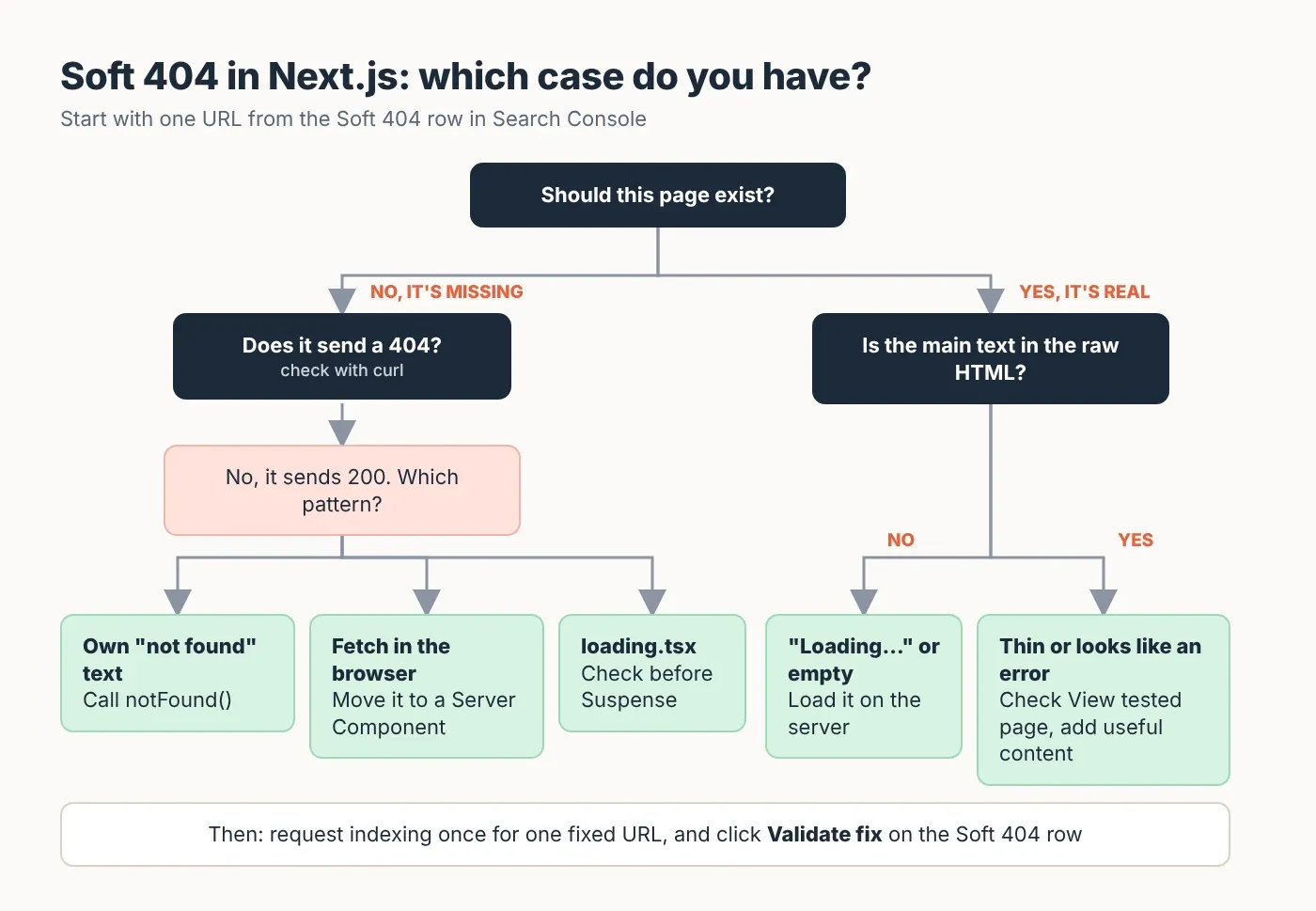
I built a small Next.js 16 test app today with three common ways to cause this and one way to avoid it, then checked what each one sends back when Googlebot (Google's crawler) asks for it. Here's what came back, and the fix for each case.
What is a soft 404 in Next.js?
A soft 404 is a page that tells Google "all fine" with a 200 status code (the three-digit code a server sends before the page) but looks like an error, an empty page or a "not found" page. In Next.js it usually means a missing post shows a friendly message, or the content only loads in the browser.
That's Google's own definition, more or less. The Page indexing report help says a soft 404 "returns a user-friendly "not found" message but not a 404 HTTP response code". Google's page on HTTP status codes adds that if a 200 page's content suggests an error, an empty page or an error message, Search Console will show a soft 404.
Two status codes matter here:
200 means "here's your page, all fine".
404 means "this page doesn't exist". Google doesn't index URLs that return a 4xx code, and it removes ones that were already indexed.
So a soft 404 is a mismatch. The words on the page say "not found", the code says "fine", and Google has to guess. Next.js gives you a built-in way to send the right code: notFound(), a function from next/navigation that stops the page and shows your 404 page instead. The catch is that it doesn't always send a 404, as my test shows.
What I tested, and what came back
Three of the four routes sent a 200 for a post that doesn't exist. Only one sent a real 404.
The setup, so you can repeat it: Next.js 16.4.5, React 19.3.1 and TypeScript 5.9.3, App Router (the app/ folder way of building Next.js pages), production build (next build then next start) on a test server, on 9 November 2026. Each route had one real post (hello-world) and one made-up slug (the last part of the URL, here no-such-post).
I fetched every URL with curl (a command-line tool that downloads a page the way a bot does) twice: once with a normal Chrome user agent (the name a browser or bot sends to say who it is) and once with Google's Googlebot smartphone user agent. Then I opened each made-up URL in headless Chromium (a browser without a window) with the Googlebot user agent, so the JavaScript ran, and noted what the page showed. I also looked for a noindex tag (a line in the page's head that tells Google "don't show this page in search").
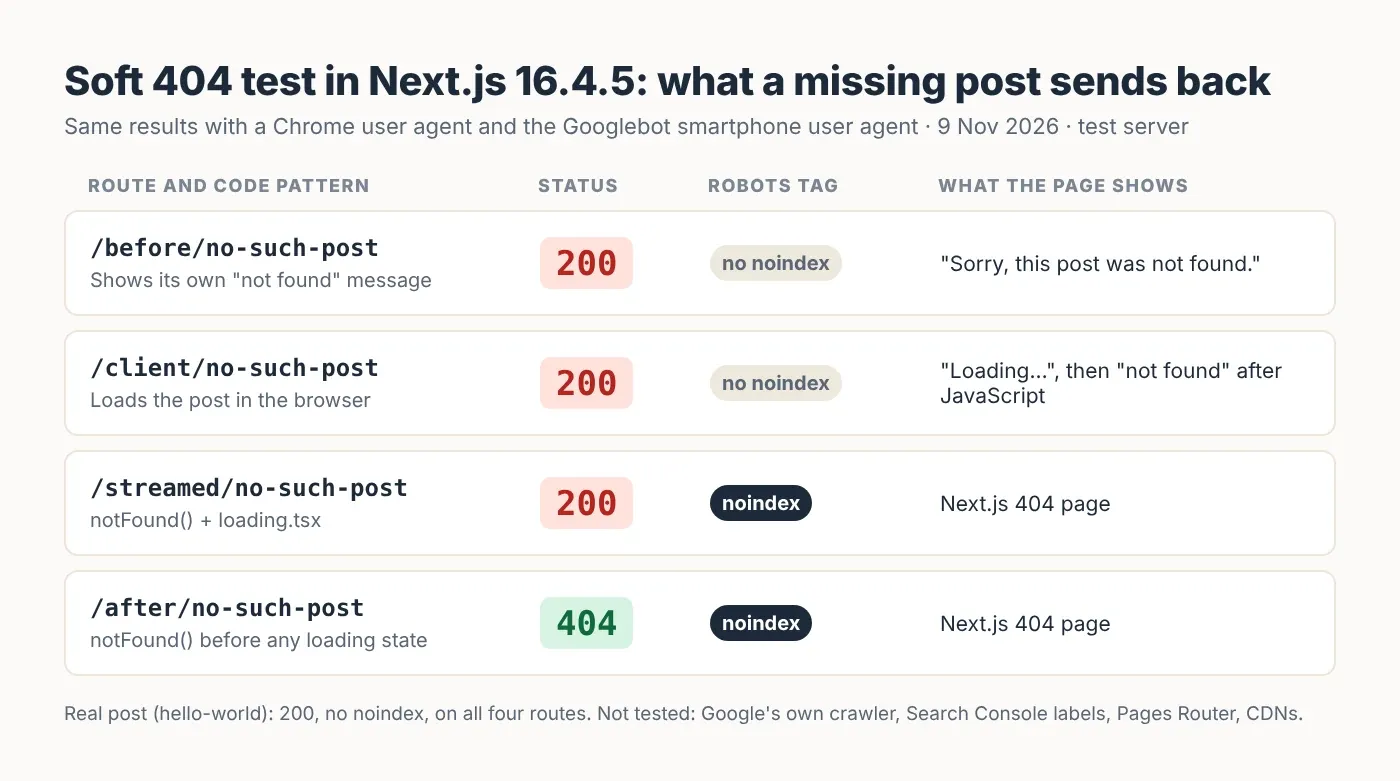
Route (what the code does) | Status, noindex tag | What the page shows |
|---|---|---|
/before: shows its own "not found" message | 200, no noindex | "Sorry, this post was not found." |
/client: loads the post in the browser | 200, no noindex | "Loading…" in the HTML, then the "not found" message once JavaScript runs |
/streamed: calls notFound(), but has a loading.tsx | 200, noindex | The Next.js 404 page |
/after: calls notFound() before any loading state | 404, noindex | The Next.js 404 page |
The real post returned 200 with no noindex tag on every route. The Chrome and Googlebot user agents got the same codes on every URL, so Next.js didn't treat Googlebot differently in this test.
What I did not test: Google's real crawler. A test server can't be checked in Search Console, so I can't tell you which row Google would put each route in. I also didn't test the older Pages Router, a CDN (a caching layer in front of your server) or any hosting company's setup. If yours changes status codes, your results can be different.
Case 1: the friendly "not found" message
If your page prints its own "not found" text, the server still sends 200. This is the classic soft 404.
It's the easiest mistake to make, because the page looks right to you. A dynamic route (one file that serves many URLs, like [slug]) matches any slug anyone types, the database finds nothing, and the page shows a polite message:
// app/before/[slug]/page.tsx — the soft 404 (don't copy this)
// checked with Next.js 16.4.5
import { getPost } from '@/lib/posts'

export default async function Page({ params }: { params: Promise<{ slug: string }> }) {
  const { slug } = await params
  const post = await getPost(slug)
  if (!post) {
    return <p>Sorry, this post was not found.</p> // looks like a 404, sends 200
  }
  return (<article><h1>{post.title}</h1><p>{post.body}</p></article>)
}
The fix is one line: call notFound() instead of returning the message. The Next.js docs say you don't need to write return notFound(); calling it is enough. Put your friendly message in app/not-found.tsx, so people still see something helpful. The full fixed page is in Case 3 below, because it also solves the next two problems.
Case 2: content that only loads in the browser
If the post is fetched in the browser with useEffect, the server has already sent a 200 and a "Loading…" page before anyone knows the post is missing.
This is the pattern in many older apps: a page marked 'use client' (it runs in the browser) that calls an API (a URL your app asks for data) after it loads. My test page's HTML said only "Loading…". After JavaScript ran, it said "Sorry, this post was not found." Both versions came with a 200.
Google does run JavaScript, so it can see the second version. But its JavaScript help page warns that apps handling errors in the browser often return a 200, which can get error pages indexed. That's a soft 404 waiting to happen.
The lasting fix is to load the post in a Server Component (a component that runs on the server, the default in the App Router), so you can call notFound() before anything is sent. If you can't move the fetch yet, Google's page gives two fallbacks: send the browser to a URL that returns a real 404, or add a noindex tag with JavaScript.
This is also how a real page can be flagged. This part isn't in the official docs, but it's widely reported: if the API call fails or is slow when Google renders the page (builds it by running its JavaScript), Google may see only "Loading…" or an error. Google's own rule (an empty page or an error message on a 200 can be a soft 404) then applies to a page that does exist.
Case 3: notFound() with a loading.tsx
A loading.tsx file makes Next.js start sending the page straight away. After that, the status code is locked at 200, so notFound() can only add a noindex tag.
Next.js streams pages: it sends them in pieces, starting with a loading state. loading.tsx wraps your page in a Suspense boundary (React's way to show a stand-in while part of the page loads), and the first piece goes out before your page code checks the database.
The not-found.js docs say it plainly: before streaming starts, Next.js returns a 404; after streaming starts, "the status code remains 200", and Next.js adds a noindex tag in both cases. The loading.js docs add that some crawlers treat these as soft 404s. My /streamed route matched the docs exactly, for both user agents.
The noindex keeps the missing page out of Google, so this case does less harm than the first two. But if you want a clean 404, check for the post before any Suspense boundary. Remove loading.tsx from that route and wrap only the slow parts in their own <Suspense>:
// app/after/[slug]/page.tsx — real 404 for missing posts
// checked with Next.js 16.4.5, React 19.3.1, TypeScript 5.9.3 (strict)
import { Suspense } from 'react'
import type { Metadata } from 'next'
import { notFound } from 'next/navigation'
import { getPost } from '@/lib/posts'

type Props = { params: Promise<{ slug: string }> }

export async function generateMetadata({ params }: Props): Promise<Metadata> {
  const { slug } = await params
  const post = await getPost(slug)
  if (!post) notFound()
  return { title: post.title }
}

async function Comments({ slug }: { slug: string }) {
  await new Promise((r) => setTimeout(r, 800)) // slow part, streams in later
  return <p>No comments yet on {slug}.</p>
}

export default async function Page({ params }: Props) {
  const { slug } = await params
  const post = await getPost(slug) // check BEFORE any Suspense boundary
  if (!post) notFound()

  return (
    <article>
      <h1>{post.title}</h1>
      <p>{post.body}</p>
      <Suspense fallback={<p>Loading comments…</p>}>
        <Comments slug={slug} />
      </Suspense>
    </article>
  )
}
This page sent a 404 for no-such-post and a 200 for hello-world, with the comments still streaming in after the post. Both generateMetadata (the function that builds the page title and tags) and the page call getPost. The generateMetadata docs say React's cache can be used when you aren't using fetch, so the lookup runs once per request. In my test it ran once, not twice. Here getPost is a placeholder for your own database or CMS (content management system) call:
// lib/posts.ts — a stand-in for your database or CMS
// checked with Next.js 16.4.5, React 19.3.1
import { cache } from 'react'

export type Post = { slug: string; title: string; body: string }

const posts: Post[] = [
  { slug: 'hello-world', title: 'Hello world', body: 'A real post with real text.' },
]

// cache() makes generateMetadata and the page share one lookup per request
export const getPost = cache(async (slug: string): Promise<Post | null> => {
  await new Promise((r) => setTimeout(r, 300)) // pretend this is a slow database call
  return posts.find((p) => p.slug === slug) ?? null
})
The docs also suggest doing the check in Proxy (Next.js 16's new name for middleware, the code that runs before a page is built) if you need it before any rendering. I didn't test that route today.
When the page is real: check what Google saw
For a page that does exist, find out what Google actually got: the status code, and whether the HTML had real content in it.
Open URL Inspection in Search Console, paste the URL, click Test live URL, then View tested page. Google's help page says the screenshot there shows how Google renders the page. Look for "Loading…", an empty area or an error.
Check the status code as Googlebot. Replace the address with yours:
curl -s -o /dev/null -w "%{http_code}\n" \
  -A "Mozilla/5.0 (Linux; Android 6.0.1; Nexus 5X Build/MMB29P) AppleWebKit/537.36 (KHTML, like Gecko) Chrome/142.0.0.0 Mobile Safari/537.36 (compatible; Googlebot/2.1; +http://www.google.com/bot.html)" \
  https://your-site.com/blog/your-post
Look at the raw HTML (right-click, View page source). If the main text isn't there, the page depends on the browser to fill it in. Move that fetch to the server, as in Case 2.
Add real content to thin pages. Google's help page recommends "adding more information on the page" when a real page is mistaken for a soft 404. A product page with one line and a price may look empty to Google.
Then ask Google to check again: request indexing once for one fixed URL, and use Validate fix on the row. The steps are in how to fix indexing problems.
I ran the same kind of check on my own site today (a Next.js site), from a normal browser while logged out. Four made-up URLs under /blog, /project, /services and the site root all returned 404 with a noindex tag, and a real post returned 200 with "index, follow". A browser check isn't Googlebot, but the status codes are the part that matters here.
If Search Console lists dozens of these and you'd rather not dig through them, this is the sort of job my team handles in Next.js development work.
What's easy to get wrong
Thinking a nice 404 page fixes it. The design is for people. Google reads the status code. A beautiful "not found" page sent with a 200 is still a soft 404.
Testing only in your browser. The browser shows the page; it doesn't show the code. Check with curl or your browser's Network tab.
Adding
loading.tsxeverywhere. It's handy for slow pages, but on a route where missing pages are common, it turns every 404 into a 200 with a noindex tag.Calling
notFound()in the page but not ingenerateMetadata. If both fetch the post, check in both. Otherwise the metadata code can crash or fill in a title for a post that isn't there.Expecting 410 to work very differently. Google says all 4xx codes except 429 "are treated the same". 404 is fine for a deleted post.
Your page can say "not found" in big letters. Google still goes by the status code.
Read next
If you'd rather have someone do this
I've built websites since 2017 and full-stack JavaScript apps, Next.js included, since 2021, across 900+ projects. If you'd like my team to find which case you have and fix it in your code, book a short call.
Questions
Questions this post answers
Is a soft 404 bad for SEO?
- A page marked as a soft 404 isn't indexed, so it won't show in Google. If the page really is missing, that's the right result, but Google had to guess, so send a real 404 (the "page doesn't exist" status code) instead. If the page is real, it's a problem: Google thinks it's empty or an error, and it won't show in search until you fix what Google sees.
Does notFound() return a 404 status code in Next.js?
- Yes, if it runs before Next.js starts streaming the page (sending it in pieces). If a loading.tsx file or a Suspense boundary (a loading stand-in) has already sent the first piece, the status stays 200 and Next.js adds a noindex tag instead. In my test on Next.js 16.4.5, the same route sent a 404 once I removed loading.tsx and checked for the post first.
How do I fix a soft 404 on a page that exists?
- Open URL Inspection in Search Console, run a live test and open View tested page to see what Google got. If it shows "Loading…", an empty area or an error, load the content on the server so it's in the HTML (the code the server sends). If the page is just very thin, add useful content. Then request indexing once and click Validate fix on the Soft 404 row.
Should I use 404 or 410 for deleted pages?
- Either works for Google. Its page on HTTP status codes (the three-digit codes a server sends before a page) says all 4xx codes except 429 "are treated the same". In Next.js, notFound() sends a 404, which is the simplest choice. Pick one and use it the same way across your site.
Why does my custom 404 page still get flagged as a soft 404?
- Because Google checks the status code, not the design. If your "not found" page is sent with a 200 (the "all fine" code), Google sees a page that says it's missing but claims to be fine. That's a soft 404. In Next.js, make sure missing pages go through notFound() before any loading state, and check the code with curl or your browser's Network tab.